Staff & roles
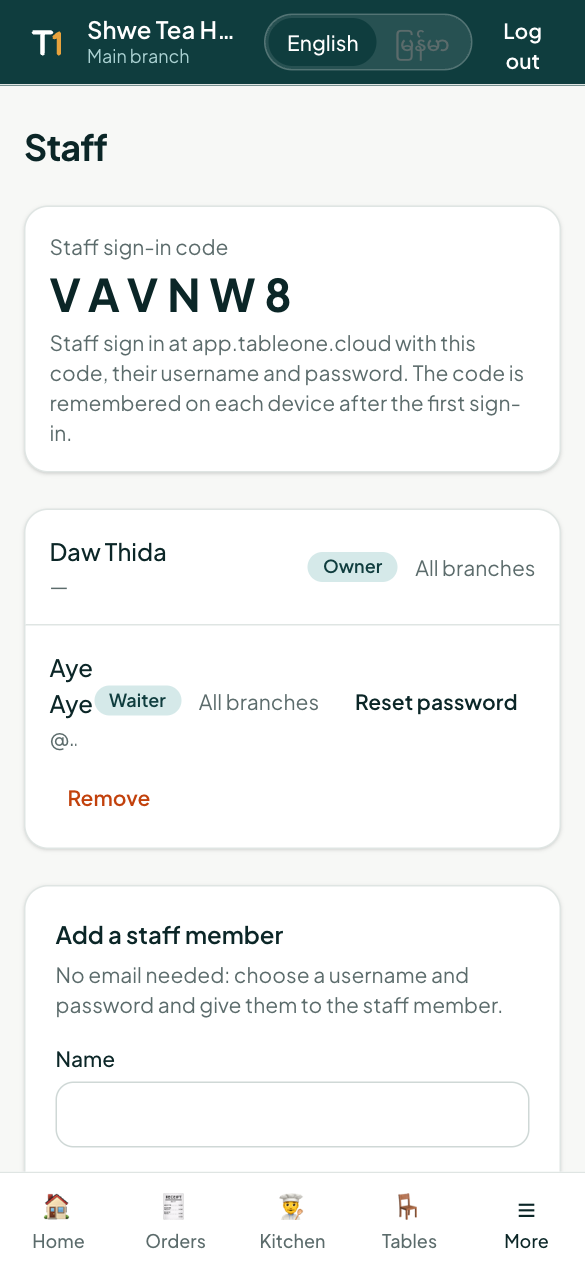
Add staff with a username and password, choose their role, reset passwords and set manager PINs.
Open More → Staff (owners and managers).
Roles
| Role | Can do |
|---|---|
| Owner | Everything, including payouts, branches and adding owners |
| Manager | Menu, prices, customers, campaigns, staff, reports, approve discounts and voids |
| Cashier | Orders, payments, receipts, printers |
| Waiter | Orders and tables |
| Kitchen | Kitchen display and printers |
Add a staff member
No email needed:
- Enter their name, a username (e.g. aye) and a password — or leave the password empty to create one.
- Choose the role and branch.
- Tap Add staff. Give them the restaurant code, username and password shown (the password is shown only once).
You can add an email if they have one; they can then also log in with it.
How staff log in
On app.tableone.cloud, the Staff tab: restaurant code, username, password. Their phone remembers the restaurant code after the first time.
Forgotten password or someone leaves
- Reset password gives them a new one and signs them out everywhere.
- Remove ends their access straight away.
Manager PIN
Owners and managers set a 4–6 digit PIN in More → My PIN. It approves discounts and voids on a shared device.